
Law firms operate in a document-heavy world—contracts, briefs, invoices, discovery materials, NDAs— among others. Traditionally, extracting and analyzing data from these files has been time-consuming and prone to errors. That’s where MuleSoft’s Intelligent Document Processing (IDP) enters, leveraging AI to transform unstructured and semi-structured documents into structured, actionable data via APIs, without the need for external services.
With IDP’s intuitive interface, you define Document Actions: workflows that use AI to extract fields like contract dates, invoice totals, party names, and due dates—complete with confidence scores and human-review steps. This not only streamlines data extraction but embeds accuracy and auditability into your legal processes.
Use Case 1: Contract Intake & Compliance Automation
Scenario: High-volume contract reviews
A midsize firm routinely processes hundreds of vendor and client contracts. Key fields (e.g., effective dates, renewal terms) must be captured accurately, yet manual review drains billable hours.
Solution with MuleSoft IDP:
- Train a Generic Document Action to extract key legal data elements: Using MuleSoft IDP’s user-friendly training interface, the legal operations team collaborates with contract analysts to upload a representative sample of contracts into the system. They annotate the documents to train the model to consistently identify fields such as parties involved, effective and expiry dates, termination clauses, and renewal conditions. The team also trains the Document Action to recognize monetary thresholds, such as contract value limits, and jurisdiction clauses that define applicable governing law. This training process ensures that the model can generalize across a wide variety of contract templates—whether NDAs, MSAs, or third-party vendor agreements—and accurately extract critical metadata that drives downstream compliance checks and legal reviews.
- Set a confidence threshold—for example, 85%. Low-confidence extractions trigger human review: Once the Document Action is trained, MuleSoft IDP allows administrators to define a confidence threshold—a percentage score assigned to each extracted field indicating the system’s certainty about its accuracy. For example, if the threshold is set at 85%, any field extracted with a lower confidence score (such as an ambiguously worded termination clause) is automatically flagged for human-in-the-loop review. This ensures that only high-confidence, accurate data is processed automatically, while more nuanced or uncertain entries are routed to a legal reviewer through a validation queue, maintaining both speed and accuracy in compliance-sensitive environments.
- Automatically publish the Document Action as an API: After training and testing the Document Action, it can be deployed as a RESTful API endpoint with a single click. MuleSoft IDP generates an OpenAPI-compliant interface, enabling other systems and flows to call the Document Action programmatically. This makes the extraction logic reusable across use cases—such as contract intake, renewal tracking, and obligation analysis—and allows it to be seamlessly embedded into enterprise-grade workflows without requiring manual file uploads or isolated batch processing.
- MuleSoft flows ingest contracts via email, SFTP, or Document Management Systems (e.g., iManage), call the IDP API, and write structured data back into the contract management system: MuleSoft’s Anypoint Platform is used to build automated integration flows that act as the glue between IDP and the rest of the firm’s tech stack. These flows can be configured to listen for new contract files arriving via monitored email inboxes, secure FTP servers, or document management systems like iManage. Once a document is received, the flow calls the IDP API, submitting the file for processing. IDP returns the extracted information in structured JSON format, which is then mapped to fields in the firm’s contract lifecycle management (CLM) platform or legal database. The MuleSoft flow may also trigger notifications for human review if required, or initiate downstream workflows such as risk assessments, clause library updates, or renewal alerts.
Result:
- Extraction time reduced considerably
- Human reviewers focus only on flagged documents
- Centralized governance and audit logging across all processed contracts
Use Case 2: Discovery & Due Diligence in M&A
Scenario: Accelerated M&A document review
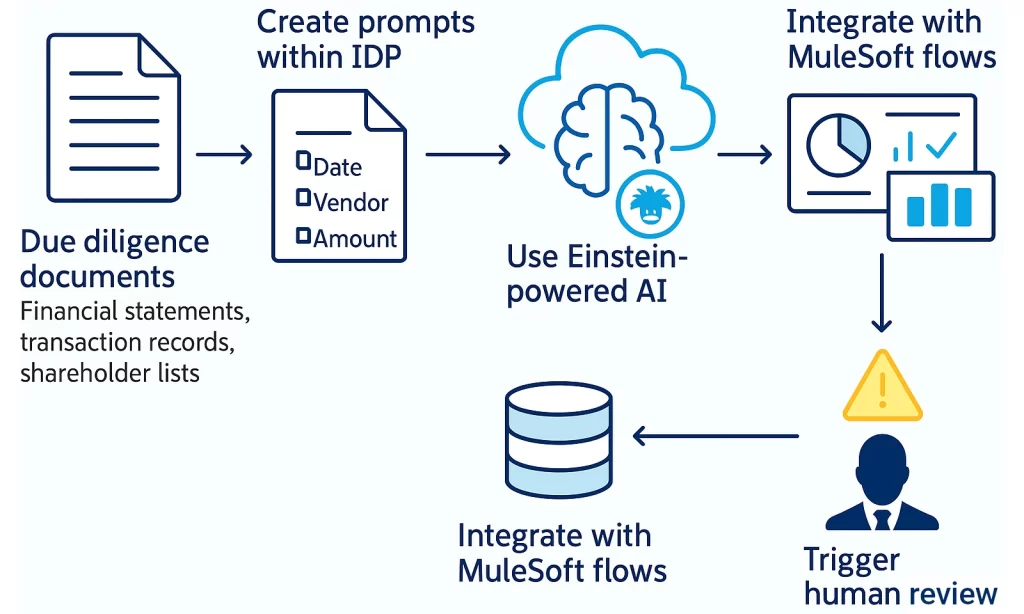
During mergers and acquisitions, law firms sift through huge volumes of due diligence documents—financial statements, transaction records, shareholder lists. Manual workflows often cause bottlenecks and time is of the essence in such scenarios.
Solution with MuleSoft IDP:
- Create prompts within a Purchase Order/Invoice Document Action to extract key fields such as purchase dates, amounts, vendor names, financial commitments or liabilities Legal and financial teams configure a specialized Document Action using MuleSoft IDP to extract structured data from due diligence documents such as purchase orders, invoices, and financial disclosures. Prompts are created to target critical fields including purchase dates, vendor identities, total amounts, and any mention of outstanding financial commitments or liabilities, which are key to assessing a target company’s obligations. The model learns to recognize variations in formats and terminology across different document types, ensuring reliable extraction even in highly heterogeneous data sets.
- Use Einstein‑powered AI (via MuleSoft’s IDP NLP or Einstein models) to interpret complex documents like scanned financial reports When documents are image-based or complex (e.g., scanned annual reports, PDF financial statements), MuleSoft IDP leverages Salesforce Einstein AI models to enhance text recognition and natural language understanding. These models are particularly adept at interpreting tabular data, footnotes, and narrative financial disclosures, where traditional OCR might fail. This allows law firms to extract deeper insights—such as implied liabilities or revenue trends—that are often buried in dense, unstructured content.
- Integrate with MuleSoft flows: automate ingestion from data rooms or SharePoint, call IDP API for structured extraction, feed results into case tools or dashboards via Anypoint MuleSoft flows are built to automate the retrieval of documents from data rooms, client-hosted SharePoint folders, or M&A deal portals as soon as new files are uploaded. These flows submit each document to the IDP API, which returns clean, structured data ready for analysis. The results are then integrated directly into legal case management tools, due diligence dashboards, or secure databases—allowing attorneys and deal teams to track progress in real time without toggling between disconnected systems.
- Set fields like “liability amount” as required to trigger human review if missing or data is suspect To maintain data quality and mitigate legal risk, MuleSoft IDP allows firms to define mandatory fields such as “liability amount” or “termination penalty.” If these fields are missing, ambiguous, or extracted with low confidence, the system automatically flags the document for human review and annotation. This hybrid model ensures that critical financial exposures are never overlooked and that legal sign-off is required for uncertain extractions before they influence decision-making.
Result:
- Document ingestion scaled to thousands per day
- Massive reduction in manual data entry
- Structured JSON output enables real-time dashboards for deal teams
Use Case 3: Invoice Processing & Billing Accuracy
Scenario: Managing billing for large firms
Legal firms juggle vendor invoices (couriers, expert witnesses), client disbursements, and internal billing. Manual processes often mean missed charges or delayed payments.
Solution with MuleSoft IDP:
- Use the prebuilt Invoice/Purchase Order Document Action to extract: invoice numbers, subtotals, totals, due dates, line items MuleSoft IDP offers a ready-to-use Document Action specifically trained on invoices and purchase orders, eliminating the need to build an extraction model from scratch. This prebuilt model accurately captures key financial fields including invoice numbers, subtotal and total amounts, line items, taxes, and due dates, regardless of formatting or vendor template differences. It also handles scanned PDFs and emailed invoice attachments, converting them into consistent, machine-readable outputs with minimal setup effort.
- Include custom prompts to identify responsible personnel or billing codes In addition to extracting standard invoice data, legal finance teams can add custom prompts to capture firm-specific fields—like matter numbers, internal billing codes, or responsible attorneys or departments. These prompts help link invoices to the correct cost centers or client disbursement records within the firm’s financial system. By embedding firm-specific logic into the extraction process, accuracy improves and reconciliation becomes much faster during billing cycles.
- MuleSoft flows: pick up vendor invoices via email or shared drive, post to IDP API, retrieve JSON data, and route intelligently MuleSoft’s Anypoint Platform enables the creation of automated ingestion flows that scan inboxes or shared network folders for newly received invoices. When a file is detected, the flow sends it to the IDP API for processing and receives structured JSON output that includes all the extracted data fields. If any of those fields fall below a configured confidence level, the invoice is automatically routed to the finance team for review and validation, preventing errors before they reach downstream systems. Once validated, the data is posted to the firm’s ERP system (e.g., SAP, NetSuite) or internal billing platform for approval, payment processing, or client invoicing.
- Set thresholds: e.g., any invoice > $10,000 with < 90% confidence triggers finance approval To protect against financial errors and fraud, firms can configure business logic within MuleSoft to apply threshold-based controls. For instance, if an invoice is over $10,000 or contains any low-confidence fields, it can be automatically flagged for manual approval before posting to the financial system. These rule-based checks not only ensure regulatory compliance but also add a layer of financial oversight without slowing down the processing of routine, lower-risk invoices.
Outcome:
- Invoice processing time dropped from days to minutes
- Reduced billing errors resulting in fewer back-and-forth interactions with customers and more focus on core business processes
- Enhanced compliance with clear audit trails of validation steps
IDP Benefits for Legal Firms
| Benefit | Impact in Legal Context |
| Time savings | Focus lawyer/paralegal time on high-value legal work, not data entry or data extraction |
| Improved accuracy | Confidence scoring + human review drastically reduce extraction errors |
| Scalability | Handles increasing document loads without linear staffing costs |
| Auditability & compliance | Structured outputs, review trails, and integrated logs support regulatory standards |
| Versatile integration | Works across iManage, NetDocuments, SharePoint, ERPs, and billing systems via MuleSoft |
Ready to Modernize Your Document Workflows?
MuleSoft IDP brings AI-powered document intelligence directly within Anypoint Platform—no need for separate subscriptions. It integrates beautifully with MuleSoft RPA, API flows, Salesforce Flow, and backend systems to deliver full, compliant automation.
Ready to unlock the full potential of MuleSoft Intelligent Document Processing (IDP) for your law firm? At Frontline 1st, we combine deep legal industry insight with proven MuleSoft expertise to streamline contract reviews, automate billing workflows, and accelerate due diligence—all while ensuring compliance and accuracy. Our consultants don’t just implement technology; we tailor it to your firm’s needs, leveraging AI-powered document actions and seamless integrations to transform how you handle legal documents. Contact Frontline 1st today to see how we can help your team work smarter, faster, and more securely with MuleSoft IDP.


